Light
Light, $19.99 / month
Base monthly AI allowance
Ideal for daily essentials.
Get notified Threedom AI Planner
Your personal assistant for work and life
Tell Threedom what needs to be done, what cannot move and what you want time for. Your personal assistant builds the plan and handles the changes.
Launch updates only. How we use your email.
Threedom is opening soon.
Get notified when it opens.
When it opens, sign in and tell it what’s going on. There’s nothing to connect and no planning system to learn.
From $19.99 a month.
The scheduling is its job
In Threedom, the only way to change your calendar is to ask. You don’t have to drag blocks or fill out event forms. A good assistant wouldn’t hand you the diary to update.
Give it everything you’re juggling, in your own words.
It knows what can and can’t move, and either gives you options or plans it.
Your calendar updates, and the chat shows what changed. You can undo the most recent change.
Sign in, tell it what’s going on, and it plans. There’s no setup routine, apps to connect or system to learn.
When you’re tired, taking a break can mean spending half an hour rearranging your whole calendar, so you push on. With Threedom, you just say you’re tired and it reshuffles the day.
Use it however suits you. Tell it what changed, or ask to move something to next week. You don’t have to rearrange the whole day yourself.
Why I wanted something simpler
I was running my life across several monitors. I had a roadmap in one app, a schedule in another and a habit tracker on a phone clipped to my desk. My to-do lists were spread across different places. Over time, it became unwieldy to manage across all those apps.
When I tried the other AI planners, most of them were suites of tools too, with everything in one place but still a whole suite to learn. I just wanted one simple thing that was easy and quick.
I also didn’t want to connect my calendar and set rigid working hours before I could start. Here, I just tell one assistant what’s going on and what I need to do, and it puts everything on my calendar for me, without the fuss.
Work keeps taking the whole day
I made this product for you. As a founder myself, I relate to all of these things. Since using this tool, I realised I do actually have enough time for everything in my life. I just needed the Threedom AI Planner to help me organise it all.
For the rest of your life, too
You might want time with your partner, a walk, your own project or something to look forward to after a long day.
Tell Threedom what you want time for. It helps you make room, alongside the work that still needs to be done.
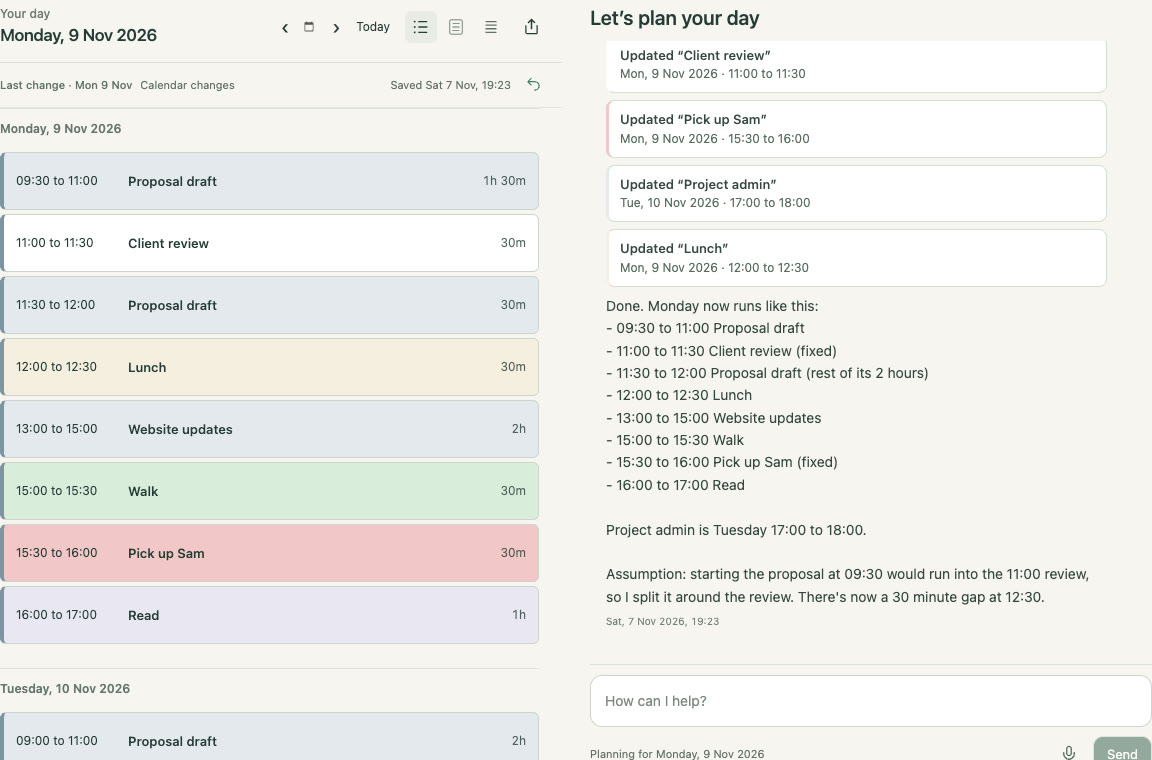
See where your time went
Tell Threedom what actually happened, as well as what you’re planning. What you share becomes a record of your days.
“How many hours have I worked today?”
“How did my week go?”
“What have I been neglecting?”
Easily calculate the time you’ve spent working, so you don’t overwork. Ask it to change your plans for you, stay organised in minutes and make room for the things you enjoy.
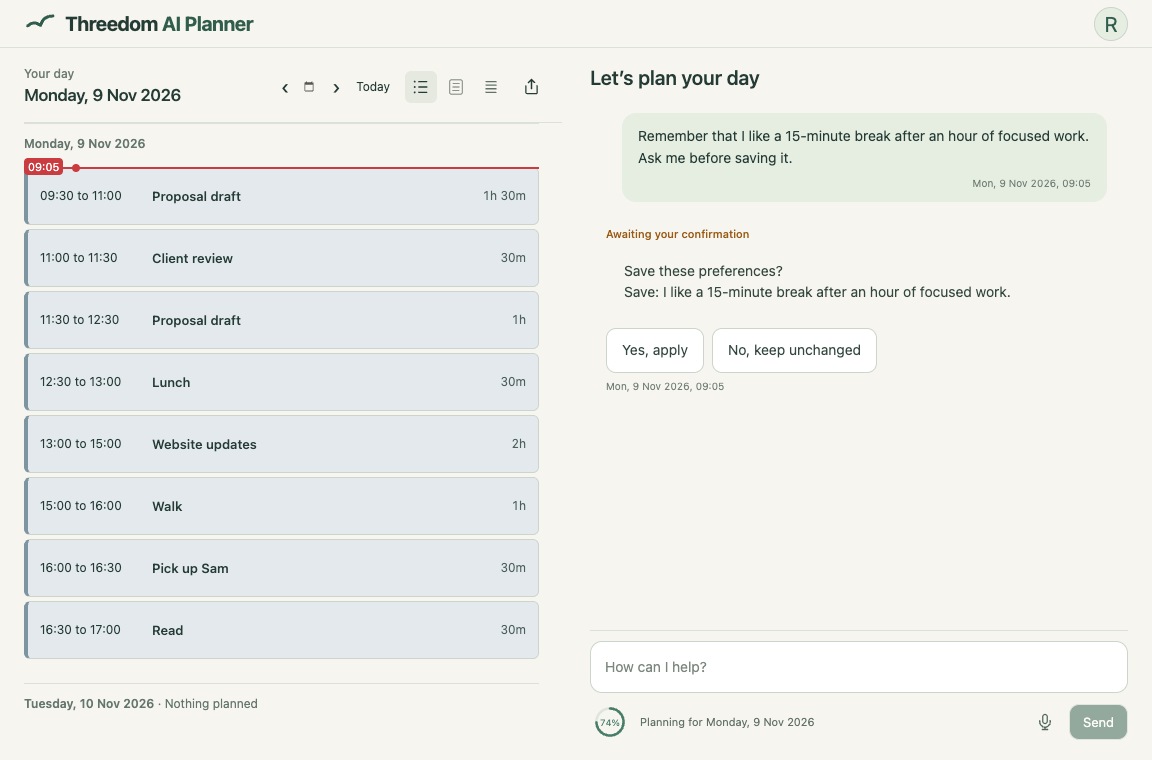
It can remember your preferences
Based on what you asked it to remember, it can help you review and improve your day. Ask it to remember things such as:
Separate on purpose
Use this alongside your existing calendar and emails, not as a replacement. Only share what you choose to. Plan your full day from wake to sleep. Let it help you plan everything out. This is for YOU, not just your work.
It doesn’t send notifications or nag you. When you already have too much on your plate, you don’t need another app pinging you. Keep your alarms and reminders on your phone or in your usual calendar. Threedom is there when you need it.
Why I built Threedom
Creator of Threedom
When business went well, I had time to plan. I had an hour and a half each morning to plan my day freely. Hard times took that away. I would sit down at my computer saying, “I’ll just get this done.” Suddenly it was 2:30am and I had to be up at 7am.
Everyone runs their life differently, and you know yourself better than I do. So Threedom doesn’t make you follow my system. It helps you manage your life your way.
Sometimes I don’t get that hour and a half. With Threedom, I don’t need it any more; it takes just minutes, letting me plan my day freely again.
Threedom is about the freedom to plan your own time. It’s given me that freedom back and the best days I’ve had in a very, very long time.
Threedom comes from a principle I’ve learned over my life: never have more than three things to manage at once, because freedom is about limits. So Threedom keeps it to three things: you, an intelligent assistant, and a plan for your life. Tell it what you’re working towards, and it helps you get there with more time for everything else.
A personal assistant for your time
Light
Base monthly AI allowance
Ideal for daily essentials.
Get notifiedPlus
5× Light’s allowance
Ideal for busy schedules & regular updates.
Get notifiedPro
10× Light’s allowance
Ideal for complex days & constant changes.
Get notifiedYou can ask for several changes together on every plan.
Monthly, in USD, tax included. Checkout shows the currency, total and recurring monthly charge. You can stop renewal at any time. If you cancel within 14 days after the day you first subscribe, we’ll refund what you paid during that period, minus a proportionate charge for the planning and dictation you’ve used, where the law allows that deduction. A confirmed upgrade payment starts a new billing period straight away with the higher plan’s allowance. Planning and dictation you’ve already used in your current billing period count towards it. Downgrades take effect at the end of your paid period. Requests use different amounts of allowance. When you subscribe, your balance is visible in the app.
Finding a personal assistant means interviews, contracts and arranging times that suit you both. Then you send work over and sometimes wait a day for it to come back. Threedom is ready the moment you sign in. Tell it what’s changed, day or night, and your plan is updated in minutes.
No. When you sign in with Google or Microsoft, it only supplies your basic account identity; it does not connect your inbox or existing calendar.
Tell it which entries are fixed. Threedom plans around them and asks before moving one. If you ask it to change a fixed entry yourself, it just does it. Check important changes, as AI can make mistakes.
Yes. Press the Undo button or type “undo”. It reverses the most recent change to your calendar or saved preferences. It’s free and doesn’t use your AI allowance.
Light includes the base monthly AI allowance. Plus has 5× Light’s allowance, and Pro has 10× Light’s allowance. Requests use different amounts depending on the work involved, so there is no fixed message count. Your usage balance is visible in the app. A confirmed upgrade payment starts a new billing period straight away with the higher plan’s allowance. Planning and dictation you’ve already used in your current billing period count towards it. Downgrades take effect at the end of your paid period.
You know what matters to you
Make time for what you’ve been putting off.
Get notifiedFrom $19.99 a month · USD · tax included